Enabling ODBC support in Perl with Perl DBI and DBD::ODBC
This document describes how to build Perl DBI, add the DBD::ODBC module and use an ODBC driver provided by Easysoft in your Perl scripts.Contents
- 1.0 Introduction
- 2.0 How does ODBC work in Perl
- 3.0 What you need to do before attempting to use an ODBC driver in Perl
- 4.0 Building Perl DBI, DBD:ODBC with ODBC (not OpenVMS)
- 5.0 Building Perl DBI and DBD::ODBC with OOB (OpenVMS)
- 6.0 Notes about old versions of DBI and DBD::ODBC
- 6.1 A note about DBD::ODBC up to 0.45 and SQL_WLONGVARCHAR
- 6.2 A note about DBD::ODBC 0.28
- 6.3 A note about DBD::ODBC 0.27
- 6.4 A note about DBD::ODBC 0.25
- 6.5 A note about DBD::ODBC 0.24
- 6.6 A note about versions of DBD::ODBC before 0.21
- 6.7 Building Perl 5.6.0, DBI 1.13 and DBD::ODBC 0.28 with OOB (OpenVMS)
- 7.0 Examples
- 8.0 Issues
- Appendix A. Useful Links
- Appendix B. Common problems accessing your DSN
1.0 Introduction
Easysoft ODBC drivers have been proven with Perl DBI-1.02 - DBI-1.50 and DBD-ODBC 0.20-1.13 although they may work with other versions.If you are working on OpenVMS please see separate OpenVMS notes later in this file.
2.0 How does ODBC work in Perl
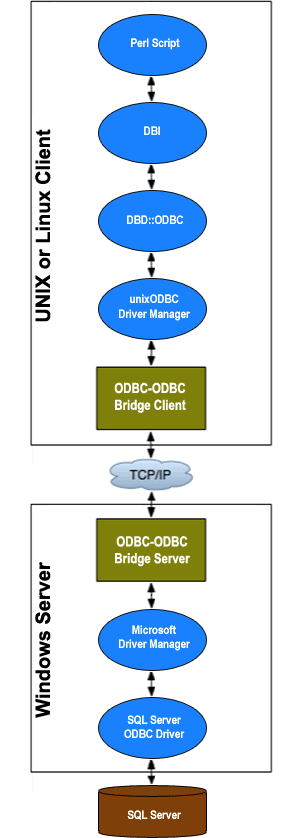
To use an ODBC driver in Perl you generally use the following components:- DBI module - the DBI is a database interface module for Perl
- a database driver such as DBD::ODBC which is a perl module the DBI loads. DBD::ODBC is the ODBC Driver for DBI.
- an ODBC driver manager such as unixODBC which comes with all Easysoft's UNIX ODBC drivers. You can also use iODBC but Easysoft recommend unixODBC.
- an ODBC driver. Easysoft provide a number of UNIX and Windows ODBC drivers at easysoft.com
use DBI; and call the DBI->connect method with a data_source. DBI's data sources are in the form "dbi:DRIVER" where DRIVER; is the DBI driver which is to be used so for DBD::ODBC you use "dbi:ODBC" and DBI will load the DBD::ODBC module for you.You build DBD::ODBC with a dependency on an ODBC driver manager such as unixODBC, so when DBI loads the DBD::ODBC Perl module your ODBC driver manager will be loaded too.
ODBC needs an ODBC data source to work with so your DBI->connect call becomes 'dbi:ODBC:ODBC_DSN' where ODBC_DSN is an ODBC data source generally defined in an odbc.ini file your driver manager is using. At this point, the ODBC driver manager will see a SQLDriverConnect or SQLConnect (ODBC APIs) call containing the ODBC data source, it will locate that DSN, lookup the ODBC driver supporting that DSN and load the ODBC driver. The ODBC driver will connect to your database engine then you can use DBI methods.
3.0 What you need to do before attempting to use an ODBC driver in Perl
- Make sure you have tested your Perl installation. If you built Perl yourself run the Perl tests.
- Make sure you have the minimum requirements of Perl DBI - see the README file that comes with DBI. For DBI 1.43 you need a minimum of Perl 5.6.
You can download the DBI module from
http://www.cpan.org/modules/by-module/DBI
or
http://search.cpan.org/search?query=DBI
Read the README that comes with DBI. - Make sure have the minimum requirement of Perl DBD::ODBC - see the README file that comes with DBD::ODBC. For DBD::ODBC 1.10 you need at least DBI 1.201.
You can download the DBD::ODBC module from
http://www.cpan.org/modules/by-module/DBD
or
http://search.cpan.org/search?query=DBD::ODBC
Read the README that comes with DBD::ODBC.
All Easysoft ODBC drivers for UNIX come with the unixODBC driver manager and we strongly recommend you use the unixODBC driver manager with Perl..
- Locate the unixODBC driver manager:
- If you installed unixODBC as part of your Easysoft installation it will be in /usr/local/easysoft/unixODBC. unixODBC programs will be in /usr/local/easysoft/unixODBC/bin.
- If you built unixODBC yourself it will be in /usr/local (by default) or wherever you set
--prefixto. unixODBC programs will be in /usr/local/bin or prefix/bin. - if you installed unixODBC as part of a RPM or package it will be in various places but the unixODBC programs should already be on your path (probably /usr/bin).
- Locate where unixODBC is storing the installed ODBC drivers and SYSTEM DSNs:
UNIXODBCBIN/odbcinst -j

unixODBC 2.2.3
DRIVERS............: /etc/odbcinst.ini
SYSTEM DATA SOURCES: /etc/odbc.ini
USER DATA SOURCES..: /home/person/.odbc.ini
In this case /etc/odbcinst.ini is where unixODBC stores a list of the installed ODBC drivers and /etc/odbc.ini contains the SYSTEM DSNs.
The odbcinst.ini file should already contain an entry for the Easysoft ODBC driver you have installed. e.g. for OOB it will look similar to this:
[OOB]
Description             = Easysoft ODBC-ODBC Bridge
Driver          = /usr/local/easysoft/oob/client/libesoobclient.so
Setup           = /usr/local/easysoft/oob/client/libesoobsetup.so
FileUsage               = 1
If you haven't got an ODBC driver in odbcinst.ini you need to check the Easysoft product installation found or installed unixODBC.
The odbc.ini file is where you define your ODBC data sources. There are SYSTEM and USER DSNs. SYSTEM DSNs are stored in the file pointed to by "SYSTEM DATA SOURCES" output by odbcinst above and USER DSNs are in the file pointed to "USER DATA SOURCES". The driver manager always looks for USER DSNs before SYSTEM ones and if you want the DSN to be accessible to everyone on the machine you should make it a SYSTEM DSN. - Create/check and test your DSNs with isql.
When you install an Easysoft ODBC driver the installation will usually create a DSN in the SYSTEM odbc.ini file. Exceptions to this are if unixODBC was not installed as part of the Easysoft installation or if unixODBC was not already found on your machine.
Check your SYSTEM odbc.ini file for the DSN to test. If your SYSTEM odbc.ini file does not contain a DSN you will need to create one - see instructions that come with the Easysoft ODBC driver you are using usually found in /usr/local/easysoft/DRIVER/docs.
If the DSN you are using requires a username and password to login to the database you need to have these to hand.
Run:
UNIXODBCBIN/isql -v DSN database_username database_password
where DSN is the name of your DSN and database_username and database_password are the login information for your database.
This should successfully connect to your database and provide a prompt at which you can type in SQL. If it doesn't then there are a number of possibilities and you should:
- Check you've set any necessary environment variables like ORACLE_HOME, LD_LIBRARY_PATH etc (see the manual for the Easysoft ODBC driver you are using).
- consult the documentation that came with the ODBC driver.
- contact Easysoft support if you have a support contract or are trialling.
- In order to test DBD::ODBC you need access to an ODBC DSN that points to a database in which you can create and delete tables and procedures. You should make sure you have created and tested this DSN as you will need it later.
4.0 Building Perl DBI, DBD:ODBC with ODBC (not OpenVMS)
NOTE: Please check the later sections in this document for specific notes about older versions of DBD::ODBC.NOTE: Although you can still build DBD::ODBC directly against the Easysoft ODBC-ODBC Bridge client ODBC driver, Easysoft strongly recommend you don't. Instead, select to install the unixODBC driver manager included with Easysoft ODBC driver distributions and build DBD::ODBC against that.
- Unpack DBI and build/test as per the instructions in the README file in the Perl DBI distribution. Install DBI.
- Unpack DBD-ODBC.
- To test DBD::ODBC you need access to an ODBC DSN that points to a database in which you can create and delete tables and procedures. See 3.0 What you need to do before attempting to use an ODBC driver in Perl.
NOTE: Do not use the [demo] data source created by the OOB installation as this is a read-only database and the make test for DBD::ODBC needs write access. - Read the README accompanying the DBD:ODBC distribution. You must define and export the following environment variables:
DBI_DSN The dbi data source, e.g. 'dbi:ODBC:YOUR_DSN_HERE'
DBI_USER The username to use to connect to the database
DBI_PASS The username to use to connect to the database
ODBCHOME The directory the unixODBC driver manager was installed in (e.g. /usr/local/easysoft/unixODBC).
If you are using the Easysoft ODBC-ODBC Bridge you can set ODBCHOME to or the /usr/local/easysoft/oob/client and build DBD::ODBC without a driver manager and directly with the OOB client ODBC driver but Easysoft recommend you use the unixODBC driver manager. Easysoft recommend building with a driver manager as it is a more flexible configuration allowing you to use multiple ODBC drivers under Perl. Increasingly, DBD::ODBC is becoming more dependent on ODBC driver manager functionality.
If you are not using unixODBC installed as part of an Easysoft ODBC driver distribution or you built unixODBC yourself you need to set ODBCHOME to where you installed unixODBC i.e. where--prefixwas set during configure or where it was installed for you (say from an RPM). There is information in 3.0 What you need to do before attempting to use an ODBC driver in Perl which will help you locate unixODBC. Basically, DBD::ODBC takes the supplied ODBCHOME environment variable and adds /lib to it to look for the libodbc.XX shared object, and adds /include to it to find the sql*.h header files.
NOTE: Recent versions of DBD::ODBC now try to guess what driver manager is installed and where it is, and you rarely need to set ODBCHOME now. However, if you have multiple ODBC driver managers (e.g., iODBC and unixODBC, even if they are only partly installed) DBD::ODBC will pick iODBC up before unixODBC (the reasons for this are too complicated to describe here). If you want to pick unixODBC before iODBC then add the-xswitch when running the Makefile.PL.
The DBI_DSN setting depends on the data source you have set in the odbc.ini file and tested in 3.0 What you need to do before attempting to use an ODBC driver in Perl - Type
perl Makefile.PL
Ignore any warnings like "Warning: LD_LIBRARY_PATH" for now.
NOTE: If you want to use Unicode on UNIX with DBD::ODBC you need to add the-uswitch when running the Makefile.PL e.g.,perl Makefile.PL -u. On Windows, DBD::ODBC currently defaults to using Unicode. For Unicode support on any platform in Perl you will need at least Perl 5.8.1. Useperl --versionto see what version of Perl you have installed. For information about Unicode support in DBD::ODBC, see the DBD::ODBC documentation and changes log. - Type
make - Make sure the database user you are using can create tables in the database as the DBD::ODBC test creates a test table.
- Type
make test
You may at this stage get errors like:
install_driver(ODBC) failed: Can't load
'blib/arch/auto/DBD/ODBC/ODBC.so
This generally means that the ODBC driver shared object or the unixODBC driver manager shared object cannot be found by the dynamic linker. You should ensure the path to any shared objects your ODBC driver depends on and libodbc.so is on the dynamic linker search path. The method for doing this depends on the OS you are running but may mean adding a path to the LD_LIBRARY_PATH, SHLIB_PATH, LD_RUN_PATH or LIBPATH environment variables or adding the same path to /etc/ld.so.conf and runningldconfig(8)(Linux). For Easysoft ODBC drivers you will need:
/usr/local/easysoft/lib
/usr/local/easysoft/unixODBC/lib (or wherever you installed unixODBC)
in the dynamic linker search path.
Once these changes have been made rerunmake test.
If the tests still fail then you need to look at the error message. You should have used the same DSN as in 3.0 What you need to do before attempting to use an ODBC driver in Perl but if you haven't go back that section and check the DSN you are using now.
Some Easysoft ODBC Drivers come with additional disagnostic tools like oobping which comes with the Easysoft ODBC-ODBC Bridge. If it is a connection issue consult the ODBC driver documentation at The Easysoft web site for how to diagnose.
After connection problems are resolved any further problems should be easily identified by the ODBC error message output. However, you should be aware that the perl DBD::ODBC tests are somewhat dependent on the database and the ODBC driver you are using e.g. The Access ODBC driver does not have SQLDescribeParam. - Once the tests succeed you can install Perl DBI:ODBC with "make install".
5.0 Building Perl DBI and DBD::ODBC with OOB (OpenVMS)
5.1 On OpenVMS/Alpha
These instructions are specific to using the Easysoft ODBC-ODBC Bridge with Perl on OpenVMS/Alpha.Easysoft has built and tested Perl 5.8.1 with DBI-1.35 and DBD::ODBC 1.05. We have also built and tested Perl 5.6.0 with DBI-1.13 and DBD::ODBC 0.28 (please see separate instructions later in this document if you need to use versions of DBD::ODBC before 1.00).
The build for Perl 5.8.1 we tested was the snapshot at http://www.iki.fi/jhi/perl@18983.tgz.
We used MMS 3.2-01 throughout as our copy of MMK appeared to give errors like:
%MMK-F-SDCMIX, single/double-colon dependency mix found for target
RE_EXEC.OBJ
%MMK-F-ERRUPD, error status %x1c148064
We also used DECC V6.0-001 on OpenVMS V7.2.
All the tools you need to uncompress and unpack Perl and the DBI/DBD modules may be found off the VMS Perl site (see Useful links).
- If you have not yet installed Perl, get Perl
5.8.1 (or newer), unpack it and run the configure.com. Answer all the
questions, run mms, mms test and if OK, mms install. You will find
instructions at http://www.sidhe.org/vmsperl/readme.vms.html.
When we did this we got one failure:
lib/vmsish...........................FAILED at test 22
This was a problem for people with positive offset from GMT and a patch was posted on the vmsperl mailing list. It does not however cause a problem. - Get the latest Perl
DBI module, uncompress and unpack. Read the README. The sequence you
need is described below but please make sure you read all this section
first as you will need to edit the Makefile.PL and DBD.PM files.
perl Makefile.PL
mms
mms test
mms install
With DBI-1.35 and this Perl snapshot we had two problems with the descrip.mms generated from the Makefile.PL by MakeMaker:
-
"%MMS-F-GWKNOACTS, Actions to update CONFIG
are unknown."
This seems to be caused by a rule with no action. If you search Makefile.PL for the line:
config :: $(changes_pm)
add on the next line:
$(NOECHO) $(NOOP)
Make sure you put a tab before "$(NOECHO)". -
"%MMS-F-GWKNOACTS, Actions to update
[.BLIB.ARCH.AUTO.DBI]DRIVER.XST are unknown."
This seems to be caused by the lines generated by MakeMaker commented as "these two keep make -j4 working". In [.lib.DBI]DBD.pm search for:
# these two keep make -j4 working
        $(DBI_DRIVER_XST) :: pm_to_blib
        '.$xstf_h.' :: pm_to_blib
and add to each rule:
$(NOECHO) $(NOOP)
so you have:
# these two keep make -j4 working
        $(DBI_DRIVER_XST) :: pm_to_blib
                $(NOECHO) $(NOOP)
        '.$xstf_h.' :: pm_to_blib
                $(NOECHO) $(NOOP)
Make sure you put a tab before "$(NOECHO)".
perl Makefile.PL.
You might have to specify the target as "all" as mms picks the first target in the descrip.mms file and you might get an error because some of the [.blib] directory structure was not created.
When building DBI, you will probably see a few warnings about symbols being trimmed as they are very long - don't worry about this.
You may also see %SYSTEM-W-BADFILEVER errors for dbiprof.pl.rno, dbiproxy.pl.rno and possibly dbish.pl.rno (pre 1.35). This problem is due to the double file extension which is invalid in OpenVMS but we currently do not know the solution (you can ignore it).
When testing DBI, we got no errors. Some tests for iThreads, PurePerl (Kids, profiling, preparse) were skipped. -
- Get the latest DBD::ODBC, uncompress and unpack. OOB was verified with DBD::ODBC 1.05 but it needs a patch to work properly on OpenVMS with OOB. Versions after DBD::ODBC 1.05 may include the required patch.
You can get GNU patch for OpenVMS from Useful Links at the bottom of this document, apply the patch by hand (not difficult but possibly error prone) or apply the patches on a machine where you already have GNU patch. The patch is included in the extras sub directory of the OOB distribution and is called [.DBD_ODBC_1_05]DBD-ODBC-1_05_VMS.PATCH.
If you are applying the patch by hand with reference to the patch file you need to remove all lines starting with '-' and add all lines starting with '+'. Otherwise unpack DBD::ODBC, change into the created directory and run:
patch --verbose --backup --input=DBD-ODBC-1_05_VMS.PATCH -p0
If you can't get GNU patch or don't understand enough about patch files to make the changes necessary you can try editing Makefile.PL and making the following changes:
Change
$myodbc = 'esodbc'
        if !$myodbc && <$odbchome/*esoobclient*>;
to
$myodbc = 'esodbc'
        if !$myodbc && <$odbchome/lib/*esoobclient*>;
and search for the section starting:
elsif ($myodbc eq 'esodbc')
In this block look for occurances of "$odbchome" used without a following '/' and add "/lib" so "$odbchome" becomes "$odbchome/lib". You also need to locate the "-leasyrpc" and add "-lextras". You should end up with something like this (comments have been omitted and changed lines are marked with ->):
The reason for this change is that the OOB distribution has changed to put the libraries in [.odbchome.lib] whereas they were in [.odbchome] before and additional functions are in libextras.olb.
You now need to define where you installed OOB. You do this by defining the ODBCHOME logical as the directory where the OOB client was installed. e.g. suppose you installed OOB in DKA200:[MARTIN.OOB] you need to:
define/log ODBCHOME DKA200:[MARTIN.OOB]
You also need to define a logical called DBI_DSN which specifies the DBD ODBC driver and the data source name. Create a local OOB client data source called test in the file []odbc.ini. which points to a remote data source e.g.
    [test]
    serverport = ntserver:8888
    targetdsn = ntsystemdsn
    logonuser = nt_username
    logonauth = nt_password
Then define DBI_DSN as:
define/log DBI_DSN "dbi:ODBC:test"then define DBI_USER as:
define/log DBI_USER "database_username"then define DBI_PASS as:
define/log DBI_PASS "database_password"You can now run:
perl Makefile.PL
to generate the mms description file.
Before continuing the build we should mention a few problems we came across that need minor alterations to the Makefile.PL file.
With DBD-ODBC 1.05 and this Perl snapshot we had a similar problem as with DBI (above) except the MMS-F-GWKNOACTS for DRIVER.XST goes away if DBI is installed first. The descrip.mms generated from the Makefile.PL by MakeMaker produces these errors:
-
"%MMS-F-GWKNOACTS, Actions to update CONFIG
are unknown."
This seems to be caused by a rule with no action. If you search the Makefile.PL for the line:
config :: $(changes_pm)
add to the next line:
$(NOECHO) $(NOOP)
Make sure you put a tab before "$(NOECHO)". -
"%MMS-F-GWKNOACTS, Actions to update
[.BLIB.ARCH.AUTO.DBI]DRIVER.XST are unknown."
This seems to be caused by the lines generated by MakeMaker commented as "these two keep make -j4 working". In Makefile.PL search for:
# these two keep make -j4 working
        $(DBI_DRIVER_XST) :: pm_to_blib
        $(DBI_INSTARCH_DIR)Driver_xst.h :: pm_to_blib
and add to each rule:
$(NOECHO) $(NOOP)
so you have:
# these two keep make -j4 working
        $(DBI_DRIVER_XST) :: pm_to_blib
            $(NOECHO) $(NOOP)
        $(DBI_INSTARCH_DIR)Driver_xst.h :: pm_to_blib
            $(NOECHO) $(NOOP)
Make sure you put a tab before "$(NOECHO)".
mms
Do not be surprised if the build shows some IMPFUNC, PTRMISMATCH, PROMOTMATCHW or OUTTYPELEN informational messages - these are normal.
You can now test DBD::ODBC using the OOB ODBC driver:
mms test
and finally install DBD::ODBC using:
mms install
-
5.2 On OpenVMS/Itanium
These instructions are specific to using the Easysoft ODBC-ODBC Bridge with Perl on OpenVMS/Itanium.Easysoft has built and tested Perl 5.8.8 with DBI-1.51 and DBD::ODBC 1.13.
We used the following versions:
- OpenVMS 8.2-1
- HP C V7.1-011 on OpenVMS IA64 V8.2-1
- Installed VMS821I-PCSI-V0100 upgrade
- vmstar (built from sources found in sys$common:[GNV.src.GNV.VMSTAR]
We first tried installing a Perl 5.8.6 binary from HP’s site but we had a few problems with it like mms clean failing with an access violation. If you’ve got the same problem:
perl "-MExtUtils::Command" -e "rm_f" foo.[0-9][0-9]dies with an access violation.
After HP’s binary failed we downloaded the 5.8.8 source release of perl and used that.
5.2.1 Prerequisites
Install a binary of vmstar or build it yourself. After the installation of VMS 8.2-1 we found the vmstar source files in sys$common:[GNV.src.GNV.VMSTAR].set def sys$common:[GNV.src.GNV.VMSTAR] mms clean mms copy VMSTAR.ALPHA_EXE VMSTAR.EXE vmstar :== $sys$common:[GNV.src.GNV.VMSTAR]vmstar.exeNow vmstar is a symbol pointing to the vmstar executable.
5.2.2 Building/Installing Perl 5.8.8
Download the source for Perl 5.8.8.Use vmstar to untar it.
vmstar xovf stable.tarwill create the sub directory perl-5_8_8.
Read the README.vms, then read it again.
Configure perl (see the README.vms file). We used:
@ Configure "-d" "-Dprefix=dka0:[perl]"because we wanted to take all the defaults except we wanted Perl installed in dka0:[perl].
Then type the command that Configure tells you to enter to build Perl - usually "mms".
If the build fails scroll back through the build process and look for warnings like:
%MMS-W-GMFUTURE, Time for [-.BLIB.MAN3].EXISTS is in the future:
6-AUG-2006 12:29:13.00
If you find these warnings you have probably got the same time issue we had originally which we have only found one solution to. If you can provide a better solution than we describe here please let us know. For your information, when hit this problem:
@SYS$MANAGER:UTC$TIME_SETUP SHOWproduced:
  AUTO_DLIGHT_SAV is set to "0" and DTSS is not in use.
  You will have to manually change to/from Daylight Saving Time.

  You can do this by executing SYS$MANAGER:UTC$TIME_SETUP.COM,
  or you can use SYS$EXAMPLES:DAYLIGHT_SAVING.COM.


      LOCAL TIME ZONE          = GB -- DAYLIGHT TIME
      LOCAL SYSTEM TIME        =  6-AUG-2006 11:20:11.58 (BST)
      TIME DIFFERENTIAL FACTOR = 1:00
      TIME ZONE RULE           = GMT0BST-1,M3.4.0/01,M10.5.0/02
      Change GMT to BST on the Fourth Sunday of March (26-Mar-2006) at
  01:00
      Change BST to GMT on the Last Sunday of October (29-Oct-2006) at
  02:00
The only thing that worked for use was the following change: --- lib/ExtUtils/Command.pm;-0 Fri Oct 21 03:55:12 2005
+++ lib/ExtUtils/Command.pm Sun Aug 6 13:30:45 2006
@@ -149,12 +149,11 @@ Makes files exist, with current timestam
=cut
sub touch {
- my $t = time;
expand_wildcards();
foreach my $file (@ARGV) {
open(FILE,">>$file") || die "Cannot write $file:$!";
close(FILE);
- utime($t,$t,$file);
+ utime(undef,undef,$file);
}
}
Edit the file [.lib.ExtUtils]Command.pm, delete the lines starting in a '-' and add the lines starting in a '+'.Rerun mms.
Run:
mms testWe got the following errors:
  t/io/fs...................................FAILED at test 5
  t/op/stat.................................FAILED at test 33
  ext/Devel/PPPort/t/ppphtest...............FAILED--unexpected output at test 0
  ext/List/Util/t/p_tainted.................FAILED--no leader found
  ext/List/Util/t/weak......................FAILED--unexpected output at test 7
  lib/ExtUtils/t/basic......................FAILED at test 67
  lib/ExtUtils/t/Command....................FAILED at test 8
  lib/ExtUtils/t/Constant...................FAILED at test 23
  lib/ExtUtils/t/FIRST_MAKEFILE.............FAILED at test 4
  lib/ExtUtils/t/PL_FILES...................FAILED at test 3
  lib/vmsish................................FAILED at test 22

  Failed 13 test scripts out of 892, 98.54% okay.
  ### Since not all tests were successful, you may want to run some of
  ### them individually and examine any diagnostic messages they produce.
  ### See the INSTALL document’s section on "make test".
  ### You have a good chance to get more information by running
  ###   ./perl harness
  ### in the 't' directory since most (>=80%) of the tests succeeded.
  u=40.80  s=0.00  cu=0.00  cs=0.00  scripts=892  tests=114061
We don’t know as yet whether these are test bugs or geniune errors but they don’t appear to affect using Perl DBI or DBD::ODBC although they may affect other operations in Perl.
Run
mms installto install Perl in your chosen path.
if it hangs with:
  $ mms install

  %DCL-I-SUPERSEDE, previous value of PERL_ROOT has been superseded
  %DCL-I-SUPERSEDE, previous value of PERLSHR has been superseded
  If F$TrnLnm("Sys") .nes. "" Then Deass SYS
  MCR Sys$Disk:[]miniperl.exe "-I[.lib]" installperl
  Deep recursion on subroutine "File::Path::mkpath" at lib/File/Path.pm line 162.
you may want to consult the following references:- http://www.nntp.perl.org/group/perl.vmsperl/13873 and the followups in
- http://www.nntp.perl.org/group/perl.vmsperl/13873
- http://www.nntp.perl.org/group/perl.vmsperl/13883
- http://www.nntp.perl.org/group/perl.vmsperl/13884
- http://www.nntp.perl.org/group/perl.vmsperl/13885
- http://www.nntp.perl.org/group/perl.vmsperl/13891
Running h2ph to generate the Perl copies of your header files produced:
  Cannot open perl_root:[lib.site_perl.VMS_IA64]/_h2ph_pre.ph: file
   specification syntax error at perl_root:[utils]h2ph.com line 741.
   %RMS-F-SYN, file specification syntax error
but you can ignore this as it does not affect the installation of DBI or DBD::ODBC.
Now you have Perl installed run the perl_setup.com which is placed in the directory where you installed Perl.
5.2.3 Building/Installing Perl DBI
Download DBI-1.51 and unpack it with vmstar as above.Use the normal sequence of:
  perl Makefile.pl
  mms
  mms test
  mms install
We got the warnings like the one which follows which we believe you can safely ignore:
  Warning: long symbol DBD__Perl__db_selectall_arrayref
          trimmed to DBD_Perl_db_selectal_arayref
5.2.4 Building/Installing Perl DBD::ODBC
Download the OOB Client, unzip it wherever you want it and make a note of the directory you installed it in. In this example we assume you installed it in dka0:[oob].Set up the following logicals:
  define/log ODBCHOME DKA0:[OOB]
  define/log DBI_DSN "dbi:ODBC:test"
  define/log DBI_USER "database_username"
  define/log DBI_PASS "database_password"
You will need to change ODBCHOME to wherever you installed OOB. DBI_DSN defines the DBD driver to use and the data source to use (we’ve used a data source called "test" here). DBI_USER and DBI_PASS are the database username and password required to login to your data source (amend as appropriate).
Create an odbc.ini file in the current working directory ([]) which contains:
    [test]
    serverport = ntserver:8888
    targetdsn = ntsystemdsn
    logonuser = nt_username
    logonauth = nt_password
where:- serverport is the name of the machine where you installed the OOB Server and the port it is listening on (usually 8888).
- targetdsn is the name of a SYSTEM DSN you have created on ntserver which is a working DSN using the remote ODBC driver you want to access.
- logonuser and logonauth are a valid username and password to login to ntserver i.e. the username and password you would use to login to that machine at its console.
Create a file in [] called continue.com containing one empty DCL line e.g.
$We think this is a bug in ExtUtils::MakeMaker but it defined a NOOP command in the mms descrip.mms file as continue.com and if you attempt to run mms without it you will get an error like this:
  MCR dka0:[perl]perl.exe "-MExtUtils::Command" -e cp Changes
  [.blib.lib.DBD.ODBC]Changes.pm
  @Continue
  %DCL-E-OPENIN, error opening DKA0:[NICK.MARTIN.DBD-ODBC-1_13]Continue.COM; as
  input
  -RMS-E-FNF, file not found
  %MMS-F-ABORT, For target CONFIG, CLI returned abort status: %X10018292.
We used MMS 3.2-01 throughout as our copy of MMK appeared to give errors like:
%MMK-F-SDCMIX, single/double-colon dependency mix found for target
RE_EXEC.OBJ
%MMK-F-ERRUPD, error status %x1c148064
We also used DECC V6.0-001 on OpenVMS V7.2.
Type
mmsAs with DBI, you can safely ignore the warnings like:
Warning: long symbol DBD__ODBC__db_selectall_arrayref
        trimmed to DBD_ODBC_db_selectal_arayref
All the tools you need to uncompress and unpack Perl and the DBI/DBD modules may be found off the VMS Perl site (see links below).Now, if you OOB Server is up and running, you;ve set up the odbc.ini file in the current working directory correctly and created a working SYSTEM DSN on the OOB Server machine that works you can run:
mms testWe got failures in 02simple.t for the data sources test because we are not using an ODBC driver manager (safe to ignore) and errors in 20SqlServer.t test 5 which look like:
  1..37
  ok 1 - use ODBCTEST;
  ok 2 - use Data::Dumper;
  ok 3 - errors on data comparison
  ok 4 - temporary table handling
  Can't change param 1 maxlen (51->50) after first bind at t/20sqlserver.t line
  180.
  # Looks like you planned 37 tests but only ran 4.
  # Looks like your test died just after 4.
You can fix this problem by editing the dbdimp.c module. Look for the line:
else if (maxlen && maxlen != phs->maxlen) {at around line 2931 and change it to:
else if (maxlen && maxlen > phs->maxlen) {You can now run:
mms installto install DBD::ODBC.
6.0 Notes about old versions of DBI and DBD::ODBC
6.1 A note about DBD::ODBC up to 0.45 and SQL_WLONGVARCHAR
Versions of DBD::ODBC from 0.25 conditionally build with support for SQL_WLONGVARCHAR. A problem can arise in OOB when DBD::ODBC is built directly with OOB or unixODBC which manifests itself as the error:[unixODBC][Easysoft ODBC (Server)]Memory allocation error (SQL-S1001)(DBD: describe/SQLBindCol err=-1)This occurs when you issue a query returning a SQL_WLONGVARCHAR (ntext in MS SQL Server) column. DBD::ODBC only builds support for SQL_WLONGVARCHAR if SQL_WLONGVARCHAR is defined in the ODBC headers it is built with. When built without support for SQL_WLONGVARCHAR if a SQL_WLONGVARCHAR column is encountered it is bound with the column size returned by SQLDescribeCol instead of LongReadLen. The Makefile.PL that comes with DBD::ODBC does not ensure sqlucode.h is written to dbdodbc.h when building with OOB and unixODBC. You can correct this by adding a "#include <sqlucode.h>" to dbdodbc.h after running
perl Makefile.PL
or by editing the "esodbc" or "unixodbc" sections of Makefile.PL and
adding "print SQLH qq{#include <sqlucode.h>\n};" to the end.Please also read the notes for 0.24 and 0.25 for further information.
6.2 A note about DBD::ODBC 0.28
If you are building DBD::ODBC with the unixODBC driver manager then you should note there was a change in unixODBC which requires a small modification to DBD::ODBC's Makefile.PL prior to building DBD::ODBC. The following entry from the OOB FAQ describes the problem:4.42 Why do I get "undefined symbol: SQLParamData" when testing DBD::ODBC?
When building DBD::ODBC with unixODBC and running the make test you see something like this:
PERL_DL_NONLAZY=1 /usr/bin/perl -Iblib/arch -Iblib/lib
-I/usr/lib/perl5/5.00503/i386-linux -I/usr/lib/perl5/5.00503 -e 'use
Test::Harness qw(&runtests $verbose); $verbose=0; runtests @ARGV;' t/*.t
t/01base............install_driver(ODBC) failed: Can't load
'blib/arch/auto/DBD/ODBC/ODBC.so' for module DBD::ODBC:
blib/arch/auto/DBD/ODBC/ODBC.so: undefined symbol: SQLParamData at
/usr/lib/perl5/5.00503/i386-linux/DynaLoader.pm line 169.
The undefined symbol SQLParamData is reported by the dynamic linker as the first symbol it looked for but could not find.
This happens when building DBD::ODBC with unixODBC because the Makefile.PL is now incompatible with newer unixODBC releases. The Makefile.PL searches ODBCHOME/lib for *odbc*.* and finds libodbc.so AND libodbcinst.so. It then goes on to choose libodbcinst.so which is the incorrect shared object. You can check this by running ldd on blib/arch/auto/DBD/ODBC/ODBC.so where you will probably see something like:
libodbcinst.so1 (libc6) => /usr/local/easysoft/unixODBC/lib/libodbcinst.so1To fix this edit the Makefile.PL and delete the second '*' in the line:
elsif ($myodbc eq 'unixodbc') {
        my @ilibs = <$odbchome/lib/*odbc*.*>;
so it becomes:
elsif ($myodbc eq 'unixodbc') {
        my @ilibs = <$odbchome/lib/libodbc.*>;
Now rerun
perl Makefile.PL and it should pick up the correct libodbc shared object.6.3 A note about DBD::ODBC 0.27
See 0.25 and 0.24.6.4 A note about DBD::ODBC 0.25
0.25 is like 0.24 except the SQL_Wxyz wide character support is conditionally compiled in if your ODBC driver defines wide characters. If you want wide character support please follow the instructions below for 0.24.6.5 A note about DBD::ODBC 0.24
A change was made to DBD::ODBC 0.24 which sometimes prevents it building with OOB (and a number of other ODBC drivers and driver managers) out of the box. From DBD::ODBC 0.24, the driver appears to be required to define SQL_Wxyz data types. The header files that come with OOB do define the SQL_Wxyz data types but only if the WIN32, __unix__ or __vms__ macros are defined. If your compiler does not define any of these (you will get undefined references to SQL_WVARCHAR etc) you will need to modify the generated Makefile (see below) to add a -D__unix__ to the definition of CCFLAGS. Whether your compiler defines __unix__ or not you should add -DSQL_NOUNICODEMAP to CCFLAGS too.We hope this situation will be rectified in a future release of DBD::ODBC.
6.6 A note about versions of DBD::ODBC before 0.21
Prior to DBD::ODBC 0.21, DBD::ODBC did not require a driver manager. This changed in DBD::ODBC 0.21 and it is assumed versions thereafter. The Easysoft ODBC-ODBC Bridge does not require a driver manager on non-Windows platforms to work as it was written before ODBC 3.0 driver managers were available for UNIX and it contains all the necessary driver manager functionality. However, from DBD::ODBC 0.21, DBD::ODBC requires the ODBC driver manager APIs SQLDrivers and SQLDataSources. These functions were not available in versions of OOB prior to the 0.4.0.0 beta but are included from 0.4.0.0 onwards.If you are building DBD::ODBC 0.20 then you must apply the patch supplied with OOB in the extras/DBD_ODBC_0.20 subdirectory off the OOB installation path. If you have not got patch the changes are minimal and can easily be hand edited by inserting the lines starting with a "+" in the patch file.
e.g.
patch < Makefile.PL.patchDo not attempt to apply this patch to DBD::ODBC 0.21 as Jeff Urlwin has already applied it and the Makefile.PL that comes with 0.21 is fine.
DBD::ODBC 0.21 contains the iODBC driver manager distribution and OOB will work with this driver manager. However, if you want/need to use a driver manager then Easysoft recommend the unixODBC driver manager available from unixodbc.org. There are a number of reasons for this:
- The unixODBC project started by Peter Harvey is now maintained by Nick Gorham who is an Easysoft developer. This means there is much greater experience with unixODBC within Easysoft and we will be able to provide better support for OOB running under unixODBC. It also means that if you find a problem in unixODBC it is much easier for us to facilitate a fix.
- At this time unixODBC supports ODBC 3.5 and is thread-safe whilst this is not true for iODBC.
- The unixODBC package contains much more than a driver manager. The aim of the unixODBC project is to provide all the ODBC functionality available on Windows for UNIX operating systems. The unixODBC package may be built with the QT libraries to allow GUI configuration of DSNs and drivers. It also contains the GUI DataManager program which may be used to explore your ODBC data.
- From OOB 0.4.0.0, the OOB installation for UNIX can automatically install itself using the unixODBC installer program to run under unixODBC.
- If you have DBD::ODBC 0.20 then you can directly build DBD with any version of OOB and you do not need to use a driver manager unless you want to support multiple ODBC drivers through Perl.
- If you have DBD::ODBC 0.21+, then you can do as in [1] but you will require OOB 0.4.0.0 (or above).
- If you want to use a driver manager or need to because you have multiple ODBC drivers then Easysoft recommend the unixODBC manager. OOB will however work with the iODBC driver manager.
6.7 Building Perl 5.6.0, DBI 1.13 and DBD:ODBC 0.28 with OOB (OpenVMS)
These instructions are specific to using the Easysoft ODBC-ODBC Bridge with Perl on OpenVMS.Easysoft has built and tested Perl 5.6.0, DBI-1.13 and DBD::ODBC 0.28, although a patch to DBD::ODBC is required to build with OOB (see later).
We used MMS 3.2-01 throughout as our copy of MMK appeared to give errors like:
%MMK-F-SDCMIX, single/double-colon dependency mix found for target
RE_EXEC.OBJ
%MMK-F-ERRUPD, error status %x1c148064
We also used DECC V6.0-001 on OpenVMS V7.2.
All the tools you need to uncompress and unpack Perl and the DBI/DBD::ODBC modules may be found off the VMS Perl site (seeUseful Links below).
- If you have not yet installed Perl, get Perl 5.6.0 (or newer), unpack it and run the configure.com. Answer all the questions, run mms, mms test and if OK, mms install.
When we did this we got three failures:
    glob-basic - failed on test 3
    vmsish - failed on test 7
    warnings - failed on test 216
It is our understanding that the glob failure is due to the fact that the test does not take into account that glob() works differently on OpenVMS. There are patches for vmsish on the vmsperl mailing list. - Get the latest Perl DBI module, uncompress and unpack. Read the README. You should be able to simply do:
    perl Makefile.PL
    mms all
    mms test
    mms install
Make sure you specify the target as "all" or mms picks the first target in the descrip.mms file and you will probably get an error because the [.blib] directory structure was not created e.g.
    %MMS-F-GWKNOPRN, There are no known sources for the current target
    [.BLIB.ARCH.AUTO.DBI]DRIVER.XST
When building DBI, you will probably see a few warnings about symbols being trimmed as they are very long - don't worry about this.
You may also see %SYSTEM-W-BADFILEVER errors for dbiproxy.pl.rno and dbish.pl.rno. This problem is due to the double file extension which is invalid in VMS but we currently do not know the solution.
When testing DBI, we got errors from examp.t:
    t/examp
    can't run t/examp.t. invalid argument
    FAILED before any test output arrived
Usually when this happens the best thing to do is rerun the tests with TEST_VERBOSE=1 set e.g. mms/macro=TEST_VERBOSE=1 test however, as the test did not run this does not help. However, if you change into the t subdirectory and run the examp test individually the test succeeds. e.g.
    set def [.t]
    perl -"T" examp
We have found a reference in the vmsperl mailing list to this which suggests the test calls Perl with a command line that is much too long while passing a library list explicitly - Get the latest DBD::ODBC, uncompress and unpack. OOB
was verified with DBD::ODBC 0.28 but the Makefile.PL needs a patch to
work properly on VMS. Versions after DBD::ODBC 0.28 may include the
required patch (you can check by searching for the string VMS in the
DBD::ODBC Makefile.PL file).
You can get GNU patch for VMS from Useful Links, apply the patch by hand (not difficult but possibly error prone) or apply the patches on a machine where you already have patch. The patch is included in the extras subdirectory of the OOB distribution and is called [.DBD_ODBC_0_28.DBD-ODBC-0_28_VMS.PATCH].
If you are applying the patch by hand you need to remove all lines starting with - and add all lines starting with +. Otherwise unpack DBD::ODBC, change into the created directory and run:
patch --verbose --backup --input=DBD-ODBC-0_28_VMS.PATCH -p0
You now need to define where you installed OOB. You do this by defining the ODBCHOME logical as the directory where the OOB client was installed. e.g. suppose you installed OOB in DKA200:[MARTIN.OOB] you need to:
define/log ODBCHOME DKA200:[MARTIN.OOB]
You also need to define a logical called DBI_DSN which specifies the DBD ODBC driver and the data source name. Create a local OOB client data source called test in the file []odbc.ini. which points to a remote data source e.g.
    [test]
    serverport = ntserver:8888
    targetdsn = ntsystemdsn
    logonuser = nt_username
    logonauth = nt_password
    targetuser = db_username
    targetauth = db_password
Then define DBI_DSN as:
define/log DBI_DSN "dbi:ODBC:test"You can now run:
    perl Makefile.PL
    mms all
    mms test
    mms install
7.0 Examples
Some Easysoft ODBC drivers contain Perl examples in the examples subdirectory of the driver.There are some test programs in addition to those mentioned above in the Perl DBD:ODBC distribution in the mytest subdirectory of DBD-ODBC (listtabs.pl and testfunc.pl). Unfortunately, listtabs.pl seems to be a little out of date in respect of Perl DBI as it expects a statement handle from the tables method and expects to find a fetchrow method.
8.0 Issues
8.1 Bound Parameters and MS Access
Perl DBD:ODBC may sometimes use bound parameters but this requires support for SQLDescribeParam. The MS Access ODBC driver does not currently support SQLDescribeParam and so bound parameters must be avoided when using Perl->MS Access or Perl->OOB->MS Access.8.2 Memory Leak Bug
On March 30th 2001 Tim Bunce (author of DBI) reported the following bug to perl5-porters:----- Forwarded message from Tim Bunce <Tim.Bunce@ig.co.uk> -----
Date: Fri, 30 Mar 2001 15:38:27 +0100
From: Tim Bunce <Tim.Bunce@ig.co.uk>
To: Perl 5 porters <perl5-porters@perl.org>
Cc: Tim Bunce <timbo@ig.co.uk>
Subject: Memory leak localizing a tied variable
The script appended below demonstrates a memory leak when doing a
local() on a tied variable.
I found this because someone reported that local($dbh->{RaiseError})=1
(and similar) leaked memory and thought it maybe a DBI bug.
The script demonstrates that it's not.
Perl 5.005 and 5.006 leak but 5.004 doesn't. I've not got a 5.7.0
handy. I'd be grateful if someone could test it on the current bleadperl.
Thanks.
Tim.
#!/usr/local/bin/perl -w

print "localizing tied variable leak test for perl $]...\n";
# 5.006   does leak
# 5.00503 does leak
# 5.00404 doesn't leak

use strict;
use Tie::Hash;
tie my %tie_hash => 'Tie::StdHash';

my $count = 0;
my $ps = (-d '/proc') ? "ps -lp " : "ps -l";

mem_test() while 1;

sub mem_test {
    system("echo $count; $ps$$") if (($count++ % 1000) == 0);
    local($tie_hash{Foo}) = 1;
}
----- End forwarded message -----